Introduction
AXON is the data ingestion and quality layer of the DEDOMENA.AI platform. It lets you bring in datasets from files or connected sources, automatically clean and validate them against configurable rules, and produce audit-ready quality reports — all before the data is used downstream for anonymization, synthetic data generation, or analysis.
Every dataset that passes through AXON is profiled, scored, and checked for compliance risk, giving you a clear picture of its quality before it enters any workflow.
Flow Overview
After the Review & Rules step, AXON starts processing in the background — running rule application, statistical profiling, AI insights, and risk evaluation in parallel. While that happens, you continue to the Metadata & Compliance step. Once both are complete, the dataset is available in the Work Space.
Phases Details
Step 1 — Upload File
Select the origin of your data. AXON supports seven source types:
-
Local File — Drag and drop or browse from your computer
-
URL — Direct link to a publicly accessible file
-
Drive Storage — Google Drive and SharePoint
-
Cloud Storage — AWS S3, Google Cloud Storage, and Azure Blob Storage
-
Data Warehouse — BigQuery and Snowflake
-
Database — PostgreSQL and MySQL
-
CRM — Fluxforce, Pipedrive, Salesforce, Hubspot, and Odoo
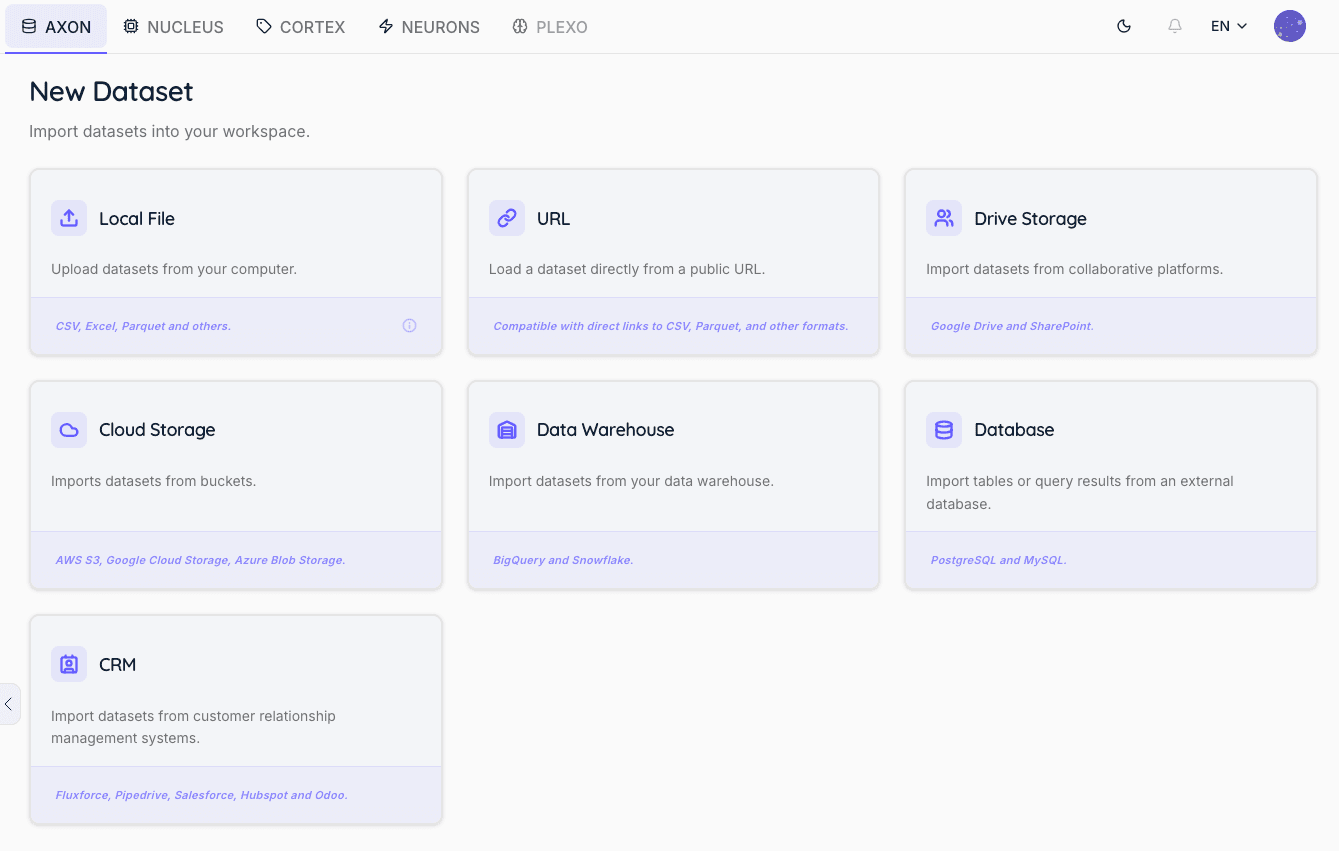
For local file uploads, drag the file onto the upload area or click to open the file browser. Once the file appears in the list, click on the corresponding box to proceed.
Supported formats by type:
-
Dataset —
.csv,.xlsx,.parquet— Full profiling, rules, and quality scoring -
Document —
.pdf,.docx,.txt— Content extraction and structure analysis -
Image —
.png,.jpg,.jpeg,.tiff— File properties and compliance metadata -
Audio —
.mp3,.wav,.flac— File properties and compliance metadata -
Video —
.mp4,.avi,.mov— File properties and compliance metadata
For tabular datasets, AXON automatically detects encoding, delimiters, and headers on ingestion, and identifies column types, null patterns, and structural inconsistencies before any rules are applied.
Step 2 — Preview
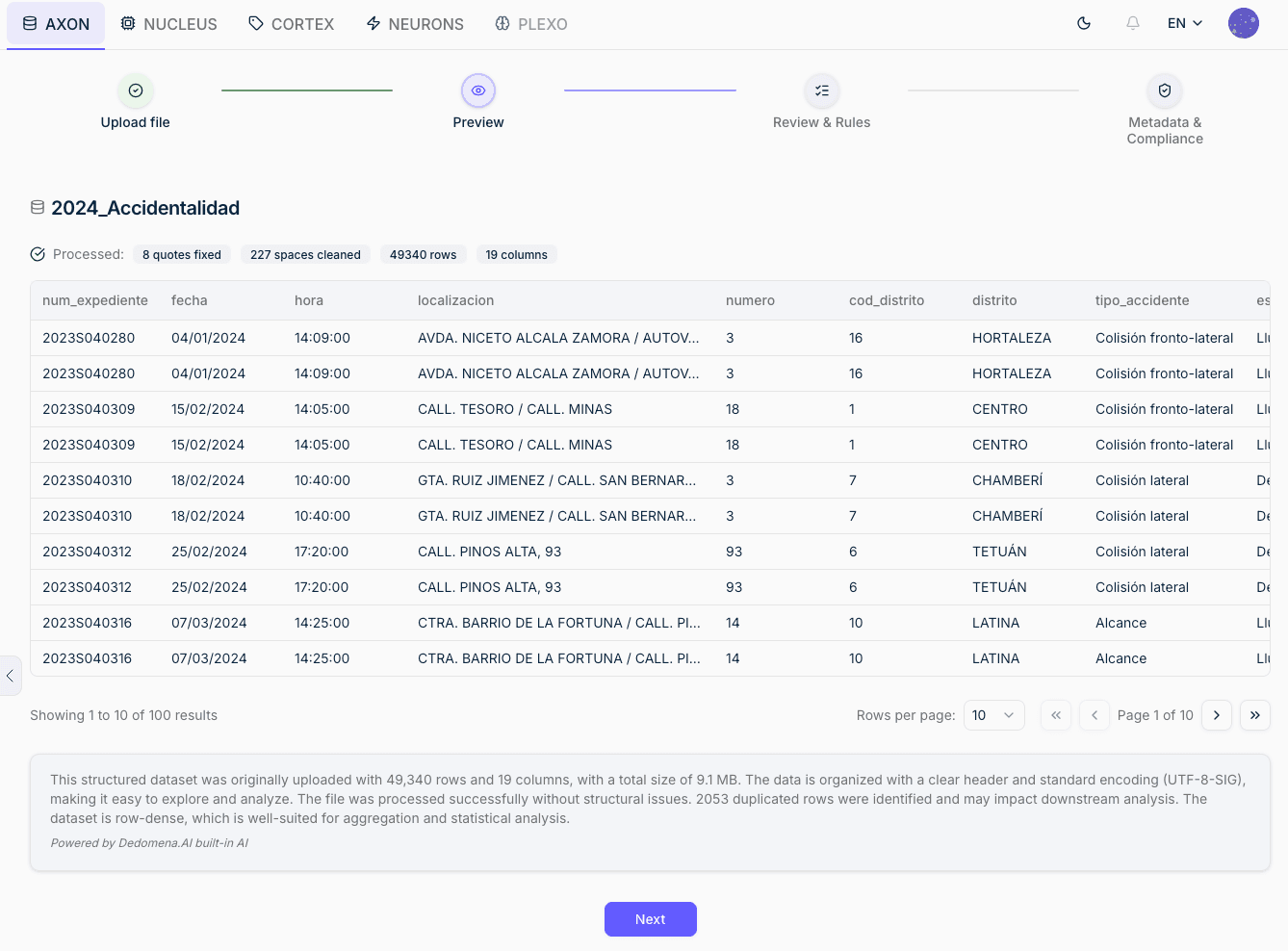
AXON displays a preview for every supported file type. The preview adapts to the content:
-
Dataset (CSV, XLSX, Parquet) — Paginated data table with row and column count, plus an AI-generated plain-language summary of the dataset's structure and content
-
Document (PDF, DOCX, TXT) — Extracted text content and file structure overview
-
Image (PNG, JPG, TIFF) — Image render and basic file properties
-
Audio (MP3, WAV, FLAC) — File properties and audio metadata
-
Video (MP4, AVI, MOV) — File properties and video metadata
No action is required at this step — review the preview to confirm the file was read correctly, then click Next.
Step 3 — Review & Rules
> This step applies to tabular datasets only (CSV, XLSX, Parquet). For documents, images, audio, and video files, the flow moves directly from Preview to Metadata.
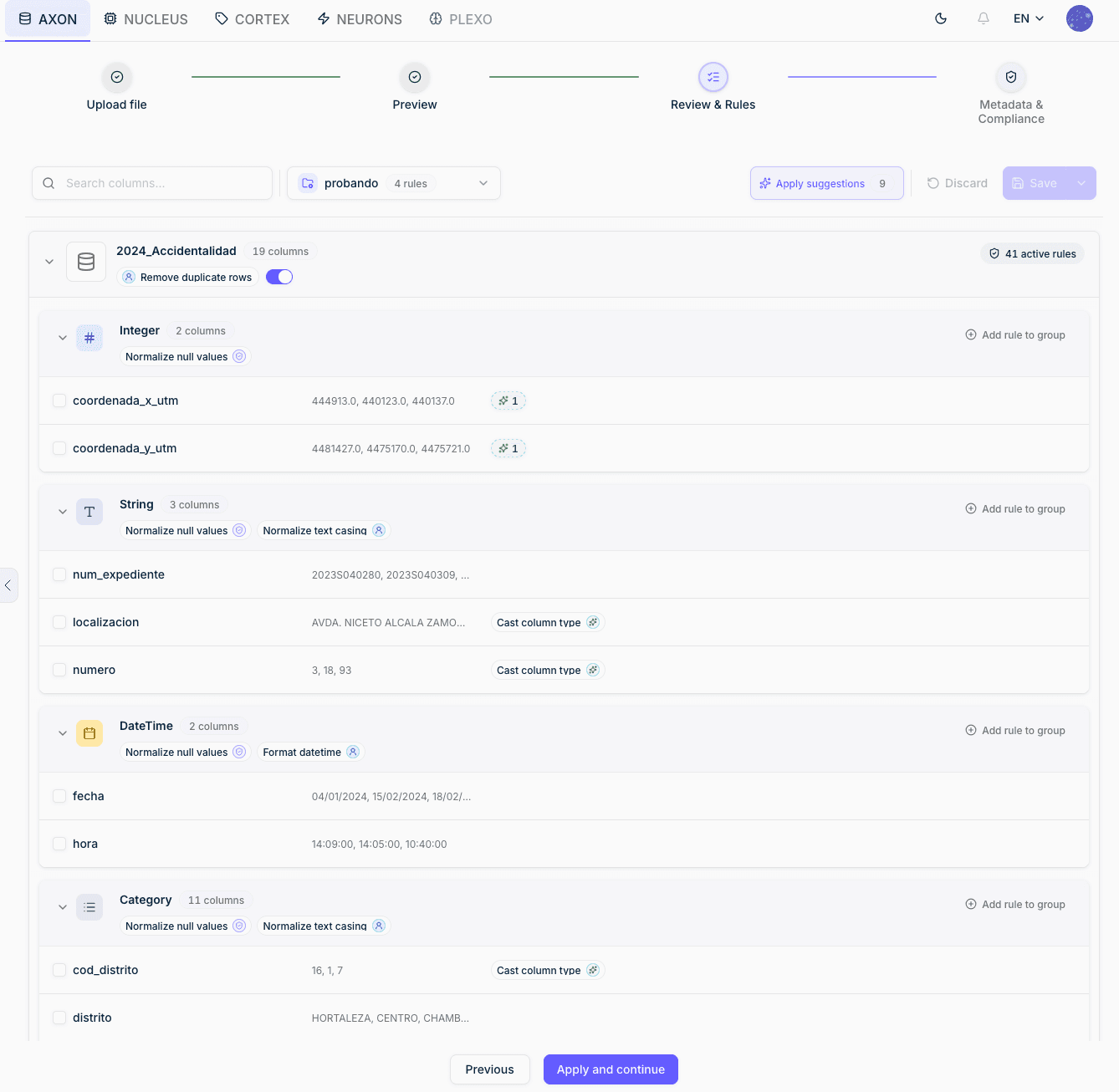
This step lets you configure how the dataset will be validated and cleaned before it is processed.
Column grouping by type
AXON automatically infers the type of each column and groups them accordingly: integer, decimal, text, category, datetime, or boolean. Rules in the selected template are applied per type group, so a text rule applies to all text columns, a datetime rule to all datetime columns, and so on.
Rule templates
A rule template pre-configures which rules to apply to each column type. If your workspace has an active default template, it is pre-selected automatically. You can switch templates at any point using the dropdown, or proceed without a template if you prefer to configure rules manually later.
Column templates
In addition to general templates, column templates map rules to specific column names. If a column template exists whose column names match those of the uploaded dataset above a configurable threshold, it is applied automatically — no manual selection needed.
Rule badges and AUTO rules
Each active rule appears as a badge on its column type group. Rules marked AUTO have been identified by AXON as high-confidence recommendations based on the data it detected — they will be applied automatically. Other rules can be enabled or disabled manually.
Dataset-level rules
Some rules operate on the entire dataset rather than individual columns. The most common is Remove duplicate rows, which appears as a toggle at the top of the view.
Once you are satisfied with the configuration, click Apply and continue to start processing.
Step 4: Processing (Automatic — Runs in Parallel)
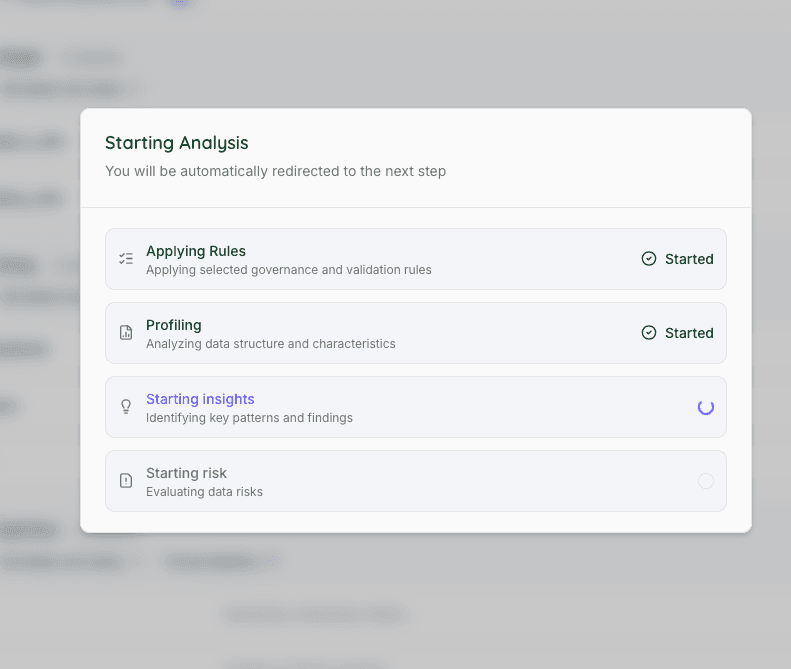
After the Review & Rules step, AXON automatically runs four processes simultaneously in the background:
-
Rule Application — Applies the selected template rules and any auto-applicable corrections.
-
Statistical Profiling — Computes column-level statistics: distributions, outliers, null rates, unique counts, and more.
-
AI Insights — Generates a narrative analysis of dataset content, patterns, and anomalies.
-
Risk Evaluation — Detects sensitive data fields and assesses GDPR relevance and compliance exposure.
Step 5 — Metadata & Compliance
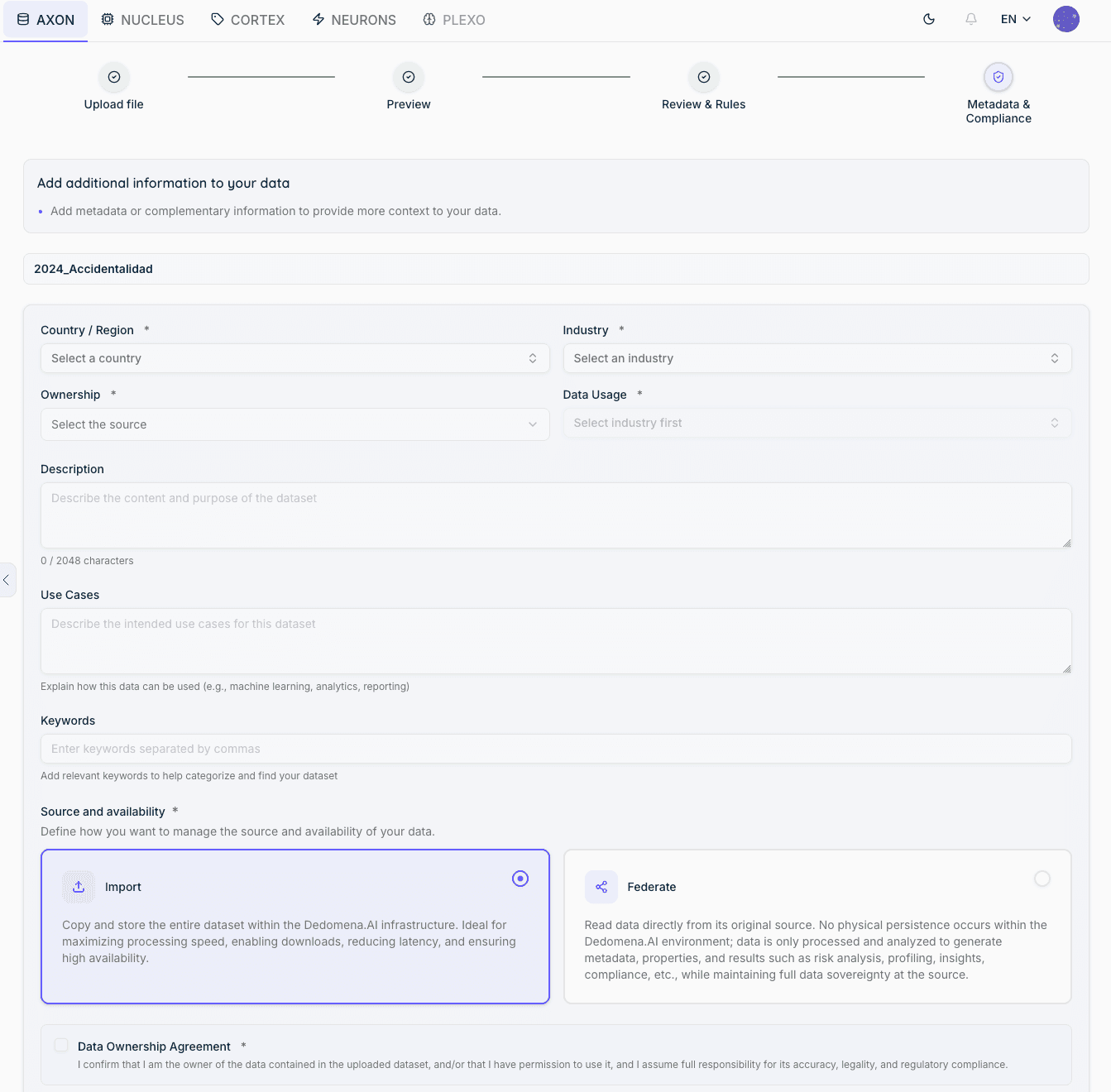
Provide context that AXON uses for risk assessment, audit reporting, and data governance. Required fields are marked with ✱.
Classification (required)
-
Country / Region ✱ — Geographic scope of the data
-
Industry ✱ — Sector the data belongs to
-
Ownership ✱ — Organization or source responsible for the data
-
Data Usage ✱ — Intended purpose (depends on Industry selection)
Context (optional)
-
Description — Free-text summary of the dataset content and purpose (up to 2,048 characters)
-
Use Cases — How the data will be used (e.g., machine learning, analysis, reporting)
-
Keywords — Comma-separated tags for search and classification
Source & Availability
Defines how Dedomena.AI manages and accesses the data:
-
Import (recommended) — Copies and stores the full dataset in Dedomena.AI infrastructure. Best for maximum processing speed, enabling downloads, reducing latency, and ensuring high availability.
-
Federate — Reads data directly from the original source on demand. No physical copy is stored in Dedomena.AI; only metadata, properties, profiling, risk, insights, and compliance results are persisted. Maintains full data sovereignty at origin.
AI-Generated Content (coming in next release)
A required yes/no field indicating whether the dataset was fully or partially generated by an AI system. This information is used for compliance tagging and audit traceability.
Data Ownership Agreement
A required confirmation checkbox stating that you are the owner of the uploaded data and/or have permission to use it, and that you assume full responsibility for its accuracy, legality, and regulatory compliance.
Dataset Detail View
Click the eye icon or select View from the actions menu to open a dataset. The detail view is organized into tabs:
Details
Displays all metadata collected during the upload flow, plus technical file properties detected automatically:
-
Description, Use Cases, Keywords — contextual information provided at upload
-
Provider, Country/Region, Continent, Industry, Data Usage, Publication Date, Creation Date — classification metadata
-
Properties — Extension, original file size, encoding, delimiter, header detection, number of rows and columns
-
Dataset ID — unique identifier for API and integration use
-
Available Formats — download options (e.g., CSV, Direct Download)
Profiling
Statistical analysis computed per column after upload. Includes value distribution, outlier detection, null rate, unique count, entropy, and type-specific statistics. A visual chart is generated for each column based on its detected type.
Preview
A visual preview of the asset content, adapted to its type. For tabular datasets, this is a paginated data table. For documents, images, audio, and video files, the preview renders the file directly so you can inspect its content without downloading it.
Insights
AI-generated narrative analysis of the dataset's content, patterns, anomalies, and overall structure. Generated automatically during the upload processing phase.
Visuals
Available for tabular datasets only. Lets you create simple charts to visually explore the data in each column — bar charts, pie charts and other chart types depending on the column's data type. Useful for quickly spotting distributions, outliers, or trends without leaving the platform.
Compliance
Compliance indicators and sensitive element detection results. Shows which columns contain potentially sensitive data (names, identifiers, financial data, etc.), the assigned risk level, and GDPR relevance. Columns can be marked as exempt from risk if their sensitivity is intentional or known.
Governance
The governance view shows what AXON changed, what still needs attention, and provides export options for audit purposes.
Quality scores — Cleaning and validation scores shown before and after processing, so you can see the improvement produced by the applied rules.
Automatic corrections (left panel) — Every rule that was applied automatically, with:
-
The rule name and source (user, system, or recommendation)
-
Before → after examples
-
Total count of affected values
Issues requiring manual attention (right panel) — Values that failed validation but were not automatically corrected, because correction was not safe or not possible given the configured rules. These require a manual decision.
Exporting audit files:
-
Download Review — A representative sample audit — one summary row per rule with up to 5 before/after examples
-
Download Audit — Full compliance CSV — every flagged value, correction applied, and validation result
Rules & Validation
AXON includes 14 configurable rules that can be applied per column, grouped into the following categories.
Null Handling
-
Normalize nulls — Standardizes null representations (e.g., "N/A", "-", empty string) to a consistent null value
-
Impute nulls — Fills missing values using a configured strategy: mean, median, mode, or fixed value
Type & Format
-
Cast type (safe) — Converts column values to the target type; skips values that cannot be converted
-
Cast type (force) — Converts column values to the target type; nullifies values that cannot be converted
-
Format datetime — Parses and standardizes date/time values to a configured format
-
Normalize text casing — Applies uppercase, lowercase, or title case to text fields
-
Round decimals — Rounds numeric values to a specified number of decimal places
Value Replacement & Correction
-
Replace values — Maps specific values to replacements, using exact matches or regular expressions
-
Handle invalid values — Flags or corrects values that do not meet a defined validity criterion
Range & Constraint Enforcement
-
Nullify out of range — Sets values outside a defined numeric range to null
-
Clamp range — Clips values to the boundaries of a defined range (min/max)
Format & Category Validation
-
Enforce format — Validates values against a pattern (e.g., NIF/NIE, IBAN, postal code)
-
Enforce category — Validates values against an allowed list or a reference table
-
Validate unique count — Checks that the number of distinct values in a column meets a configured threshold; validation only — never modifies data
Dataset-Level Rules
- Remove duplicate rows — Detects and removes exact duplicate rows at the dataset level
Rule Templates & Reference Tables
General Templates
General templates apply rules by column type (integer, decimal, text, category, datetime, boolean). Any template can be set as the workspace default so it is pre-selected on every new upload.
Column Templates
Column templates map specific column names to specific rules. When a new dataset is uploaded and its column names match a stored column template above a configurable threshold (minimum match percentage), the template is automatically applied — no manual selection required.
Reference Tables
Reference tables are master lookup tables used by the Enforce category rule. For example, a reference table might contain the valid list of districts in a city or an official country code list. Reference tables are managed centrally and can be reused across multiple column templates and datasets.