Introduction
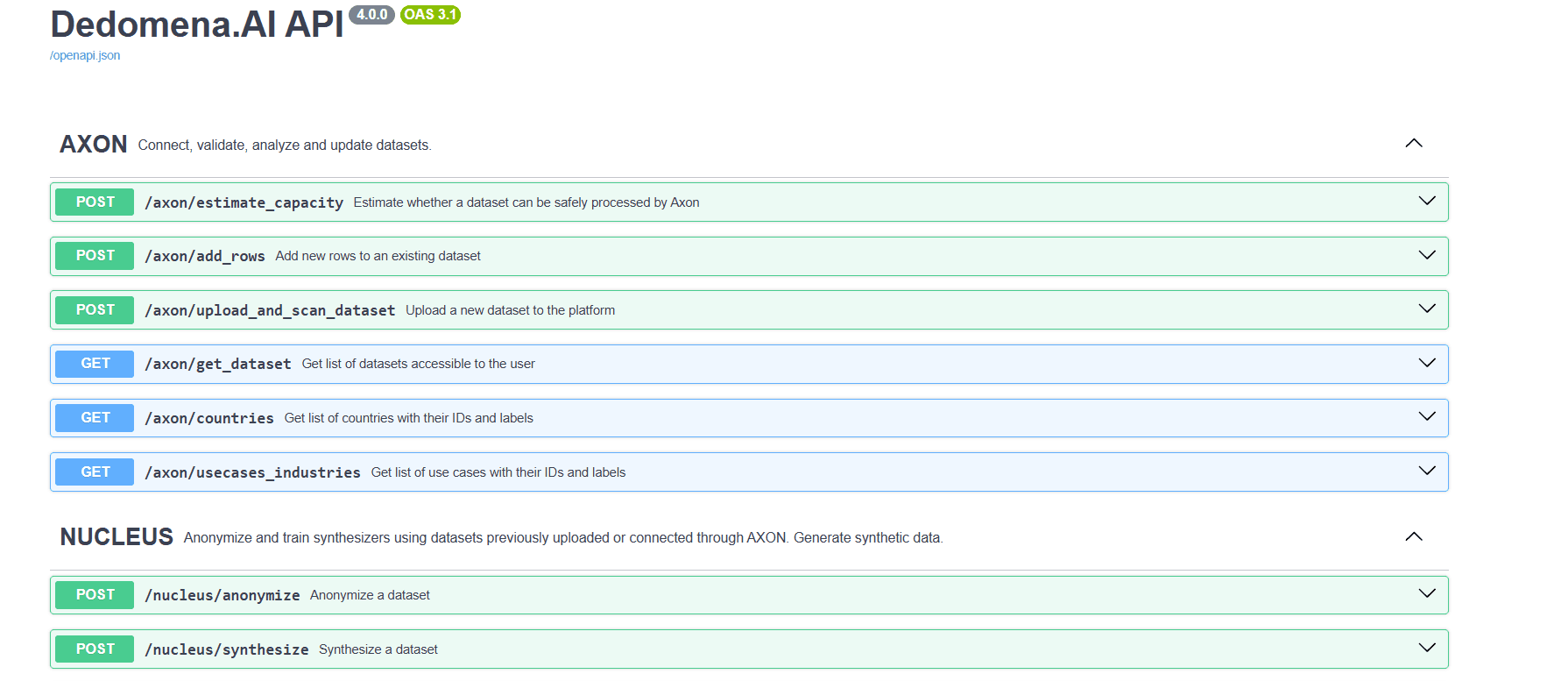
Everything you can do from the web application is also available through the DEDOMENA REST API, so you can automate anonymization and synthetic-data generation from your own applications and pipelines. Interactive documentation (Swagger) is available at the /docs endpoint of the API.
Authentication. Every request is authorized with your personal token, passed as a query parameter (?token=YOUR_TOKEN). The only exception is the method catalogue, which is public so that a user interface can load it before anyone signs in. Requests are rate-limited per account.
Working asynchronously. Anonymization and training do not finish inside the request. They answer immediately with a runId, and you follow that run with a status endpoint. Nothing is lost if your process dies in between: the run keeps going and the identifier stays valid.
Endpoint reference
Anonymization
| Endpoint | Purpose |
|---|---|
GET /nucleus/anonymization_methods | The catalogue of methods, their parameters, and which ones apply to each kind of asset. No token needed. |
GET /nucleus/anonymization_methods/resolve | Which methods are allowed for one specific column or sensitive element, and which is the default. |
POST /nucleus/anonymize | Anonymize one or several datasets. Four ways to hand over the data. |
GET /nucleus/anonymize/runs/\{run_id\} | The status of an anonymization run, and what it produced. |
GET /nucleus/download/anonymized/\{run_id\} | Temporary download links for the anonymized datasets. |
POST /nucleus/anonymize/increment | Anonymize rows that arrived after a delivery, keeping the same equivalences. |
POST /nucleus/deanonymize | Restore the original values of specific columns. |
Synthetic data
| Endpoint | Purpose |
|---|---|
POST /nucleus/synthesize | Train a synthesizer. |
POST /nucleus/generate/\{run_id\} | Generate a synthetic dataset from a trained synthesizer. |
POST /nucleus/generate/realtime/\{run_id\} | Generate a small sample and get the rows back in the response. |
GET /nucleus/download/syntheticdata/\{run_id\} | Download a generated dataset as CSV, PARQUET or JSON. |
POST /nucleus/uploadmodel | Upload a synthesizer trained locally with Nucleus Edge. |
GET /nucleus/runs/list | List your trained synthesizers. |
GET /nucleus/runs/info/\{run_id\} | Details and status of a synthesizer. |
GET /nucleus/runs/logs/\{run_id\} | Training logs of a run. |
Discovering the methods
You never have to hard-code the list of methods. Ask for the catalogue:
GET /nucleus/anonymization_methods
\{

  "version": "2026.08",

  "methods": \{

    "generalize": \{

      "code": "generalize",

      "name_en": "Generalize", "name_es": "Generalizar",

      "description_en": "Replaces the value with the range it falls into.",

      "param": \{ "name": "bucket", "type": "number", "default": 10, "min": 0.0001 \},

      "enabled": true

    \},

    "hash": \{ "code": "hash", "param": null, "enabled": true \}

  \},

  "rules": \{

    "dataset":  \{ "by_dtype":   \{ "numeric": \{ "allowed": ["generalize", "perturb", "..."], "default": "generalize" \} \} \},

    "image":    \{ "by_element": \{ "face":    \{ "allowed": ["blur", "pixelate", "redact"],   "default": "blur" \} \} \},

    "document": \{ "default_element": \{ "allowed": ["..."], "default": "..." \} \},

    "audio":    \{ "default_element": \{ "allowed": ["beep", "silence", "remove"], "default": "beep" \} \}

  \}

\}
Three things are worth reading from it:
-
methods[code].paramis the JSON schema of that method's extra parameter — its name, type, default, and the allowedoptionswhen it is a closed list.nullmeans the method takes no parameter. -
methods[code].enabledtells you whether the engine can actually run it. A disabled method may be listed so a user interface can show it as coming soon, but do not send it. -
rulesresolves which methods make sense where: by column data type for datasets, by sensitive element for images, and a single default for documents and audio.
Two optional query parameters narrow the answer: asset_type (dataset, image, document, audio) trims rules to that one kind, and enabled_only=true drops the methods that cannot run yet.
If you would rather not cross the catalogue yourself, ask for one column or one element and get the answer already resolved:
GET /nucleus/anonymization_methods/resolve?asset_type=dataset&dtype=numeric
GET /nucleus/anonymization_methods/resolve?asset_type=image&element=face
dtype is for datasets (numeric, datetime, string, categorical, boolean); element is for images, documents and audio, and accepts either the code or the display name in English or Spanish.
Writing the configuration
The configuration is the same object whichever way you send the data. It names, for each column, what to do with it:
\{

  "anonymizerName": "Employees – supplier copy",

  "anonymizerDescription": "Anonymized for the external analytics team",

  "anonymizerUseCase": "103",

  "datasets": [

    \{

      "datasetName": "employees",

      "columns": \{

        "employee_id": \{ "method": "pseudonym", "param": "EMP-\\d\{6\}" \},

        "first_name":  \{ "method": "simulate", "param": "first_name" \},

        "surnames":    \{ "method": "simulate", "param": "last_names" \},

        "email":       \{ "method": "simulate", "param": "email",

                         "derive_from": ["first_name", "surnames"] \},

        "national_id": \{ "method": "mask", "param": "opaque" \},

        "birth_date":  \{ "method": "date_shift", "param": "employee_id" \},

        "postcode":    \{ "method": "generalize", "param": 5, "type": "string" \},

        "salary":      \{ "method": "perturb", "param": 0.05 \},

        "notes":       \{ "method": "coding", "param": "surrogates" \}

      \}

    \}

  ]

\}
Top-level fields
| Field | Required | Meaning |
|---|---|---|
anonymizerName | yes | A name for the delivery. It also names the collection that groups the results. |
anonymizerDescription | yes | Free text, for whoever finds this run later. |
anonymizerUseCase | yes | Use-case code, e.g. "103" for external data sharing. |
datasets | yes | One entry per table. A single table is a list of one. |
basedOnRunId | no | Continue the equivalences of an earlier run (see Adding rows). |
runId | no | Publish your own run identifier instead of letting the API generate it. |
Per-dataset fields
| Field | Meaning |
|---|---|
datasetName | The name of the table. It is how the configuration is matched to the data you send. |
columns | Column name → what to do with it. |
assetId | Only when the data is already on the platform. Leave it out otherwise: it is resolved for you. |
rows | The data itself, when you send it inline (JSON only). |
Per-column fields
| Field | Meaning |
|---|---|
method | The method code, from the catalogue. The only required field. |
param | The method's extra parameter. A single value, or an object with named parameters. |
references | "table.column". Reuses another column's equivalences, so a foreign key gets the same replacement the entity got in its own table. |
derive_from | Builds this value from the already substituted value of another column in the same row. Accepts a list. |
group_variants | On by default. Variants of the same value in a column share one replacement, so Dedomena and Dedomena.AI end up as the same fake company. Set it to false where near-identical values are genuinely different entities. |
type | The column's type — numeric, datetime, string, categorical, boolean — when you do not want it inferred. This is what keeps a postcode like 08001 from being read as the number 8001 and losing its leading zero, which no later step can recover. |
The parameter of each method
| Method | param | Notes |
|---|---|---|
pseudonym | the pattern, e.g. "EMP-\\d\{6\}" | Literals, \d, \w, classes like [A-Z0-9] and repetitions \{n\}. Without a pattern, identifiers are generated freely. Two records never get the same one. |
simulate | the provider, e.g. "first_name" | Generates a believable value instead of noise. email, phone and url come from reserved ranges, so a generated value never belongs to a real person. |
mask | "asterisks" or "opaque" | Covers the value instead of replacing it. |
generalize | the bucket size, e.g. 5 | Replaces the value with the range it falls into. |
perturb | noise from 0.0 to 1.0 | Keeps the distribution. |
date_shift | the column to stay stable by | Moves the date, keeping the same interval for every row of the same entity, so ages and sequences still add up. |
coding | "tokens", "surrogates" or "invented" | Free text: finds the personal data inside and replaces it. surrogates reuses the replacement the same person got in their own column. |
text_regenerate | — | Discards the original text and writes a new one from the record's already substituted values. For fields too dense in personal data to trust detection. |
hash, shuffle, drop | — | |
blur, pixelate, redact | pixelate takes the block size | Images. |
beep, silence, remove | — | Audio. |
Columns you do not list are delivered untouched. That is the intended way to keep the fields that carry no personal data.
Relating several tables. A foreign key must receive the same replacement the entity received in its own table, or the data stops joining. Write it with references, using "table.column":
\{

  "datasets": [

    \{ "datasetName": "employees",

      "columns": \{ "employee_id": \{ "method": "pseudonym", "param": "EMP-\\d\{6\}" \} \} \},

    \{ "datasetName": "absences",

      "columns": \{ "employee_id": \{ "method": "pseudonym",

                                    "references": "employees.employee_id" \} \} \}

  ]

\}
Because references are written by name, not by identifier, the whole configuration can be authored before anything has been uploaded.
Sending the data — four ways in
POST /nucleus/anonymize?token=YOUR_TOKEN
The same route takes two content types, and your request says which: with application/json the body is the configuration, and the data travels inside it; with multipart/form-data the configuration goes in a configuration field and the datasets are attached as files.
Exactly one of these four per call:
| Way in | How | When |
|---|---|---|
rows | The data inline, inside each dataset of a JSON body. | Thousands of rows, straight from your own application. |
files | The datasets attached to a multipart request. | Large tables, or files you already have on disk. |
collectionId / collection_id | The identifier of a collection already on the platform. | Data you uploaded earlier, several tables at once. |
assetId / asset_id | The identifier of a single dataset already on the platform, either as a field of its dataset in the configuration or as a parameter of the call. | One table already on the platform. |
1 — The data in the body (JSON). The most convenient way from a backend: no multipart, one request.
\{

  "anonymizerName": "Employees – supplier copy",

  "anonymizerDescription": "Anonymized for the external analytics team",

  "anonymizerUseCase": "103",

  "dataSource": 232,

  "datasets": [

    \{

      "datasetName": "employees",

      "columns": \{ "first_name": \{ "method": "simulate", "param": "first_name" \} \},

      "rows": [

        \{ "employee_id": "EMP-000001", "first_name": "Ana",  "salary": 30000 \},

        \{ "employee_id": "EMP-000002", "first_name": "Luis", "salary": 41000 \}

      ]

    \}

  ]

\}
curl -X POST "https://\<your-nucleus-api\>/nucleus/anonymize?token=YOUR_TOKEN" \

     -H "Content-Type: application/json" \

     -d @anonymize_config.json
What were form fields become fields of the body: dataSource (231 public domain, 232 proprietary, 233 licensed), and optionally country and useCases.
Inline rows are held whole in memory and travel in a single request, so this way in suits thousands of rows, not millions. Above that, attach the file or upload it first.
2 — The datasets attached (multipart). Each file name without its extension must match a datasetName.
curl -X POST "https://\<your-nucleus-api\>/nucleus/anonymize?token=YOUR_TOKEN" \

     -F "configuration=$(cat anonymize_config.json)" \

     -F "data_source=232" \

     -F "files=@employees.csv" \

     -F "files=@absences.csv"
Accepted formats: csv, txt, tsv, json (an array of objects or JSON Lines), jsonl, parquet, xlsx. Separators are detected, so a semicolon-delimited CSV needs no extra flag.
3 — A collection already on the platform. Nothing is uploaded again; each datasetName is matched against the names of the assets in the collection, and a name that matches nothing is reported before the call returns.
curl -X POST "https://\<your-nucleus-api\>/nucleus/anonymize?token=YOUR_TOKEN" \

     -F "configuration=$(cat anonymize_config.json)" \

     -F "collection_id=COLLECTION_ID"
4 — A single dataset already on the platform. Either put its assetId in its dataset in the configuration, or pass asset_id alongside a configuration with exactly one dataset.
Images, documents and audio are anonymized through ways 3 and 4, after uploading them to the platform; a collection may mix them with tables. For a non-tabular asset the keys of columns are the sensitive elements to treat — face, person, and so on — rather than column names. Use /nucleus/anonymization_methods/resolve to find out which methods each element accepts. Ways 1 and 2 take tabular data only.
The answer comes back straight away:
\{ "runId": "6f1c...", "status": "processing" \}
Data that arrives in the request is registered as an asset and grouped into a collection, so the platform treats the set as related, and then profiled — that is why the run reports 10 for a while before the anonymization itself starts.
Following the run
GET /nucleus/anonymize/runs/\{run_id\}?token=YOUR_TOKEN
Answers from the first moment, so there is no window where the identifier you were given is not yet known.
status | Meaning |
|---|---|
10 | The datasets are being registered and profiled. |
50 | Finished. The output is ready to collect. |
51 | Failed. |
Once it reaches 50, the answer also lists what was produced, one entry per delivered dataset with its own assetId:
\{

  "runId": "6f1c...",

  "status": "50",

  "anonymizedAssets": [

    \{ "assetId": "9ab3...", "name": "employees_anonymized"\}

  ]

\}
Collecting the anonymized data
GET /nucleus/download/anonymized/\{run_id\}?token=YOUR_TOKEN
The API does not stream the data. It signs each object in storage and returns a temporary URL that anyone can GET until it expires, which is how large deliveries are served without turning the API into a data proxy.
\{

  "runId": "6f1c...",

  "expiresInMinutes": 60,

  "datasets": [

    \{ "assetId": "9ab3...", "name": "employees_anonymized",

      "url": "https://storage.googleapis.com/...&X-Goog-Signature=..." \}

  ]

\}
| Parameter | Meaning |
|---|---|
asset_id | Sign only that dataset. By default every dataset of the run is signed. |
expires_minutes | How long each link stays valid. One hour by default, one day at most. |
The delivered file is a CSV with ; as the separator, every field quoted, and a byte-order mark so that spreadsheet software opens it with the right encoding.
Treat the link as a secret. Its signature grants read access to anonymized personal data until it expires, so do not paste it into a ticket or a chat.
A run that has not finished answers 409 and tells you its status, rather than an empty success.
Adding rows to a delivery already made
POST /nucleus/anonymize/increment?token=YOUR_TOKEN
When new rows arrive after a delivery, you do not re-anonymize everything. Point at the previous run and send only what is new:
curl -X POST "https://\<your-nucleus-api\>/nucleus/anonymize/increment?token=YOUR_TOKEN" \

     -F "run_id=PREVIOUS_RUN_ID" \

     -F "files=@employees_new_rows.csv" \

     -F "files=@absences_new_rows.csv"
The configuration is not sent: it is read from the run being continued. A value that already appeared keeps the replacement it was given, a new identifier never repeats an old one, and the dates of a person already seen move by the same interval.
Two rules are worth knowing before you use it:
-
What was delivered before is not reprocessed. Free text cannot be reproduced — detection runs a model and regeneration writes new prose — so re-running it would change what your recipient already has.
-
Every table of the run needs its file, even one with only a header. A partial increment would leave some tables up to date and others not, with foreign keys pointing at rows that do not exist.
The data source, country and use case are inherited from the original assets, so an increment cannot declare something different from the delivery it belongs to.
Reversing an anonymization
POST /nucleus/deanonymize
Restores the original values of the columns you name, using the equivalence table stored for that asset. Only reversible methods can be reversed, and only while that table is kept — an asset whose equivalences were destroyed cannot be recovered.
\{

  "token": "YOUR_TOKEN",

  "assetId": "9ab3...",

  "columns": ["first_name", "surnames"]

\}
Synthesize
Creating synthetic data with the API is a two-step process: first train a synthesizer, then generate data from it.
1. Train — POST /nucleus/synthesize?algorithm=ALGORITHM&token=YOUR_TOKEN
ALGORITHM is one of generic, transactional, or relational. Provide the asset and the training options; the column types are taken automatically from the analysis, so you do not need to list them.
\{

  "assetId": "a1b2c3d4-...",

  "synthesizerName": "customers_v1",

  "synthesizerDescription": "Quality mode",

  "epochs": 200,

  "batchSize": 256,

  "amplify": "quality",

  "constraints": ["age\>=18"]

\}
curl -X POST "https://\<your-nucleus-api\>/nucleus/synthesize?algorithm=generic&token=YOUR_TOKEN" \

     -H "Content-Type: application/json" \

     -d @synthesize_config.json
The response includes a runId and the training status. Training runs in the background; check its progress with the run endpoints below. (You can also train from a connected database by providing a databaseId and tableName instead of an assetId.)
2. Generate — once training has finished, create a synthetic dataset from the trained synthesizer:
POST /nucleus/generate/\{run_id\}?num_rows=100000&token=YOUR_TOKEN
For small, on-demand samples you can use POST /nucleus/generate/realtime/\{run_id\}?num_rows=...&replicate_outliers=yes|no, which returns the rows directly (up to 5,000).
3. Download — retrieve the generated dataset in the format you prefer:
GET /nucleus/download/syntheticdata/\{run_id\}?file_format=CSV&token=YOUR_TOKEN
Available formats: CSV, PARQUET, JSON.
Managing runs
| Endpoint | Purpose |
|---|---|
GET /nucleus/runs/list | List all your trained synthesizers. |
GET /nucleus/runs/info/\{run_id\} | Get the details and status of a synthesizer. |
GET /nucleus/runs/logs/\{run_id\} | Get the training logs of a run. |
POST /nucleus/uploadmodel | Upload a synthesizer trained locally with Nucleus Edge |
These endpoints cover synthesizer runs. An anonymization run is followed with GET /nucleus/anonymize/runs/\{run_id\} instead.
All run endpoints take your token as a query parameter.